A Weather Widget for Waybar
I recently built a small weather module for Waybar and figured it deserves a post. It’s a single Bash script, no API keys, no Python, no node — just curl, jq, and a Nerd Font. The kind of thing that exists already, but every solution I found wasn’t perfect enough for me. I just want a simple script that shows all the info in minimalistic way and are easy to tweak.
Some more alternatives
- wttr.in scripts — neat for a terminal, but the output isn’t great for a Waybar tooltip. Also, wttr.in has been flaky lately.
- OpenWeatherMap wrappers — require an API key. I don’t want to manage keys for a status bar widget.
- Python-based modules — too heavy for what’s essentially “fetch JSON, format text.”
So I wrote my own. It uses Open-Meteo, which is completely free, doesn’t need registration, and has solid global coverage. One curl call gets you everything. It also seems to be pretty accurate, at least for my location.
What It Does
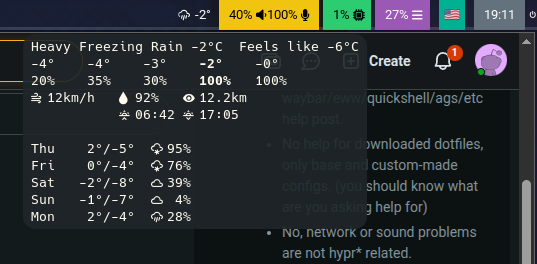
The module shows a weather icon and current temperature on the bar. Hover it, and you get a monospace tooltip with:
- Current conditions — temperature, feels like, weather name
- Hourly breakdown at 00 · 06 · 12 · 18 · 23 with the closest time slot bolded
- Wind speed, humidity, visibility
- Sunrise and sunset
- 5-day forecast with highs, lows, icons, and precipitation chance
The Interesting Bits
Dual mode output
The script detects whether it’s running in a terminal or piped to Waybar. In a TTY, it prints clean text with Pango tags stripped. In Waybar mode, it outputs proper JSON with a <tt> wrapped tooltip for monospace rendering. This means you can test it without restarting Waybar:
LAT=28.48 LON=15.03 ./weather.sh
WMO weather codes
Open-Meteo returns WMO weather codes instead of human-readable descriptions. The script maps each code to both a Nerd Font icon and a name. The icon mapping uses a case statement — nothing fancy, but it covers everything from clear sky to severe thunderstorm with hail.
Current time slot highlighting
The hourly section shows five data points through the day. The script figures out which one is closest to the current hour and wraps it in Pango <b> tags. In Waybar’s tooltip it renders as bold text, so you can instantly spot “now” in the row. Small detail, but it makes the tooltip actually scannable.
Closing Thoughts
It’s about 170 lines of Bash. Not the cleanest code in the world, but it does one thing and does it well. No daemons, no config files, no build steps. Copy, set coordinates, done.
The source is on GitHub. Feel free to fork it or just steal the parts you need.